Comparing Classifiers with tidymodels
Source:vignettes/tidymodels-workflow.Rmd
tidymodels-workflow.RmdOverview
classbound provides first-class support for the
tidymodels ecosystem via
boundary_workflow_set(). Given a workflow_set
of untrained or pre-trained classifiers, it automatically fits each
model, computes the decision boundary on a shared grid, and returns a
combined boundary data frame with a model column ready for
faceted plotting.
Required packages
install.packages(c("tidymodels", "workflowsets", "parsnip", "rpart", "nnet"))Step 2: Define model specifications
Use parsnip to define model specifications independently
of the fitting engine.
library(parsnip)
library(workflowsets)

spec_tree <- decision_tree(mode = "classification") |>
  set_engine("rpart")

spec_rf <- rand_forest(mode = "classification") |>
  set_engine("randomForest")
Step 3: Create a workflow set
A workflow_set pairs each model specification with a
preprocessing formula.
wf_set <- workflow_set(
  preproc = list(base = species ~ bill_length_mm + bill_depth_mm),
  models  = list(tree = spec_tree, forest = spec_rf)
)
wf_set
#> # A workflow set/tibble: 2 × 4
#>   wflow_id    info             option    result
#>   <chr>       <list>           <list>    <list>
#> 1 base_tree   <tibble [1 × 4]> <opts[0]> <list [0]>
#> 2 base_forest <tibble [1 × 4]> <opts[0]> <list [0]>
Step 4: Compute boundaries for all models
boundary_workflow_set() handles fitting (if not already
done) and boundary computation for every workflow in the set. It returns
a combined boundary data frame with a model column
identifying the wflow_id.
bounds <- boundary_workflow_set(
  wf_set,
  data       = penguins,
  response   = "species",
  resolution = 60
)

# The result is a classbound object with multi-model boundary data
class(bounds)
#> [1] "classbound_boundary" "classbound_multi"    "classbound"
head(bounds$boundary_data[, 1:4])
#>       model        x    y prediction
#> 1 base_tree 32.10000 13.1     Adelie
#> 2 base_tree 32.56610 13.1     Adelie
#> 3 base_tree 33.03220 13.1     Adelie
#> 4 base_tree 33.49831 13.1     Adelie
#> 5 base_tree 33.96441 13.1     Adelie
#> 6 base_tree 34.43051 13.1     Adelie
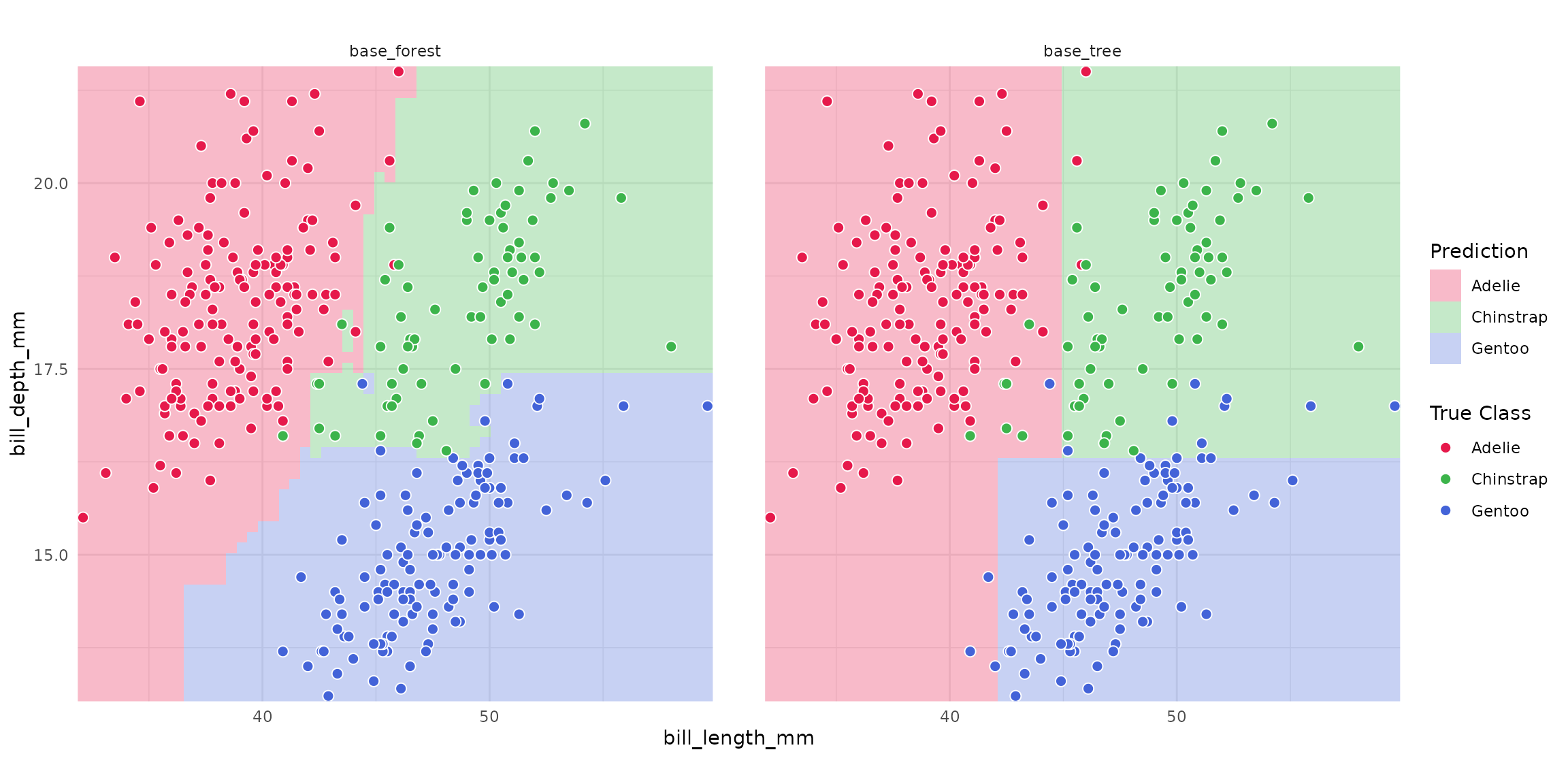
Step 5: Plot with facets
plot_boundary() automatically facets multi-model objects
by model name.
plot_boundary(
  bounds,
  obs_data   = penguins,
  x_col      = "bill_length_mm",
  y_col      = "bill_depth_mm",
  true_label = "species"
)
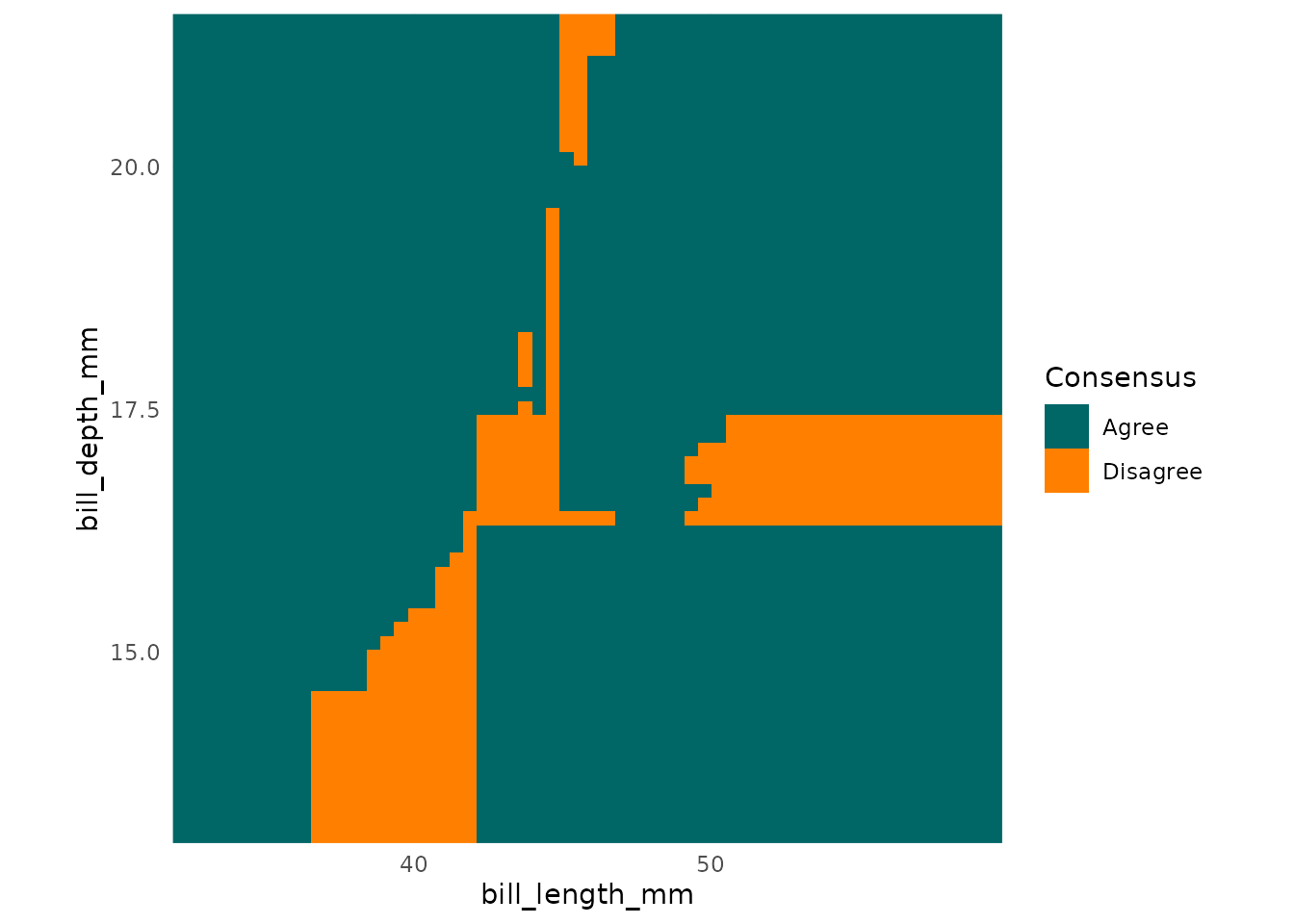
Step 6: Disagreement map
For two or more models, type = "disagreement" highlights
where classifiers predict differently, which is useful for identifying
regions of high model uncertainty.
plot_boundary(bounds,
  type = "disagreement",
  x_col = "bill_length_mm", y_col = "bill_depth_mm"
)
Using pre-trained workflows
If your workflows are already trained (e.g., from
tune::fit_resamples() or a previous call to
parsnip::fit()), boundary_workflow_set()
detects this and skips refitting.
# Fit individually first
wf1 <- workflows::workflow(species ~ ., spec_tree) |> parsnip::fit(penguins)
wf2 <- workflows::workflow(species ~ ., spec_rf) |> parsnip::fit(penguins)

# Wrap in a workflow_set (already trained)
wf_trained <- workflowsets::workflow_set(
  preproc = list(base = species ~ .),
  models  = list(tree = spec_tree, forest = spec_rf)
)
# boundary_workflow_set() will refit because wf_set workflows are not trained
# Use as_classbound() directly for pre-fitted objects:
m1 <- as_classbound(wf1, data = penguins, response = "species")
m2 <- as_classbound(wf2, data = penguins, response = "species")
bounds_manual <- boundary_compute(
  list(tree = m1, forest = m2),
  feature_range = list(bill_length_mm = c(30, 60), bill_depth_mm = c(10, 25)),
  resolution = 60
)
plot_boundary(bounds_manual,
  obs_data = penguins,
  x_col = "bill_length_mm", y_col = "bill_depth_mm",
  true_label = "species"
)